Why we ignored our worst NPS scores to strategically improve Toddle's assignment experience
Toddle assignments is the backbone of the LMS. It is where teacher create and grade assignments and students use the space to submit assingments. As the product manager and design for this initative, i was tasked with surveying users, analysis results, plan roadmaps and feature improvements and design them. I collaborated with other teams wherever we had to make across the platform improvements.
What did we achieve?
We framed questions around how users would feel if the feature were taken away, and drilling into what would most improve their experience.
Improved NPS from -3 to 10
Users rated the experience significantly higher after the update, moving from a detractor-heavy baseline to a net positive score.
30% increase in no of assignments created
Teachers created nearly a third more assignments after launch, reflecting stronger adoption and confidence in the workflow.
90% development time reduced in template customizaiton
Refactoring the template engine cut build time from days to hours, freeing the team to ship faster and iterate more freely.
We ran an NPS survey designed using the Sean Ellis method
Rather than asking a generic "how satisfied are you" question, the Sean Ellis method anchors on emotional investment: how would you feel if this feature were taken away? What would most improve your experience? This gives you signal on depth of value, not just surface satisfaction
We landed at an NPS score of -3
After collecting responses, we ran an affinity mapping session to cluster the feedback by theme. We also looked at the data through a scoring lens, grouping respondents into detractors (0–5), passives (6–7), and promoters (8–10). Three clear problem clusters emerged: the student submission experience was broken, teachers were creating assignments outside Toddle, and the grading workflow was slow.
Then we made a deliberate strategic choice: we did not focus on the detractors.
Going after detractors is expensive, uncertain, and slow. On the other hand, users who already see value in the product (passives and lower-tier promoters) are one good experience away from becoming your strongest advocates. So we focused our energy on two movements:
Getting passives (6–7) to 8+
Getting lower promoters (8–9) to 10
Creating an affinity map and prioritizing the focus areas
Problem grouping
With the problem space mapped, we needed to align on what to actually build and in what order. We created a prioritisation framework that mapped each problem cluster against two axes: frequency of the pain (how many teachers hit this?) and proximity to revenue (does solving this deepen platform adoption, reduce churn, or unlock new value?). This gave us a clear view of where to focus first and helped get engineering and product leadership aligned before a single pixel was touched.
The focus areas
Rather than shipping everything at once, we structured the work into focused releases, each one targeting a specific cluster of pain, shipped, measured, and iterated on before moving to the next. This kept the team sharp, kept scope honest, and gave us clean signal on what was actually working.
THE PROCESS
Fixing a module that is brings in 80% of our revenue meant to do this incrementally. This involved,
01
Collaborating with the design systems team
Some of the friction in assignments wasn't isolated to assignments. Components were broken or inconsistent at a system level. We identified these, fixed them in the design system first, so the fix scaled everywhere,
02
Heavy testing before release
Every change went through a rigorous testing cycle. Assignments touches grading, reports, portfolios, and student data. One bad release has downstream consequences across the whole product.
03
Taking it one feature at a time
We deliberately avoided a big-bang release. Teachers form habits fast. Incremental releases gave teachers time to adapt and gave us cleaner signal on what was working.
04
Communication changes clearly
New features only land well if teachers understand them. We partnered with the product communications team and school intermediaries to deliver articles, walkthroughs, and videos.
THE PROCESS
Ranking affinity groups as per their impact
We looked at the number of mid-to-positive NPS responses within each affinity group and used that to rank them. The groups with the highest concentration of passives and lower promoters got prioritised first, because those were the teachers closest to becoming advocates, and the ones we could move fastest.
Competitor analysis for features to guage their relative importance
Before committing to a direction, we mapped what Canvas LMS, Microsoft Teams, Schoology, Google Classroom, and SchoolBox were doing across the same feature areas.
New features were deprioritised, aiming to fix the current experience
The bulk of the NPS feedback wasn't coming from things Toddle couldn't do. It was coming from things Toddle did poorly.

ASSIGNMENT CREATION IMPROVEMENTS
Focussing on one affinity group at a time. Let’s take assignment creation experience to start with.
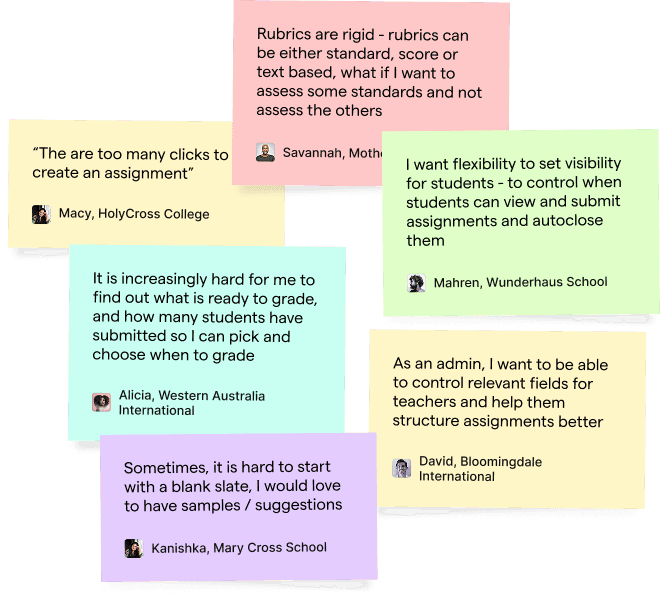
Uncovering user insights from Affinity mapping. Wherever things weren’t clear, we reached out to the users and conducted in per interviews.
Adding a title/ cover image -> Subject, duration -> Describing the assignment -> Adding templates and resources -> Tag goals and assessment tools -> Configure settings and assign
THE PROBLEM
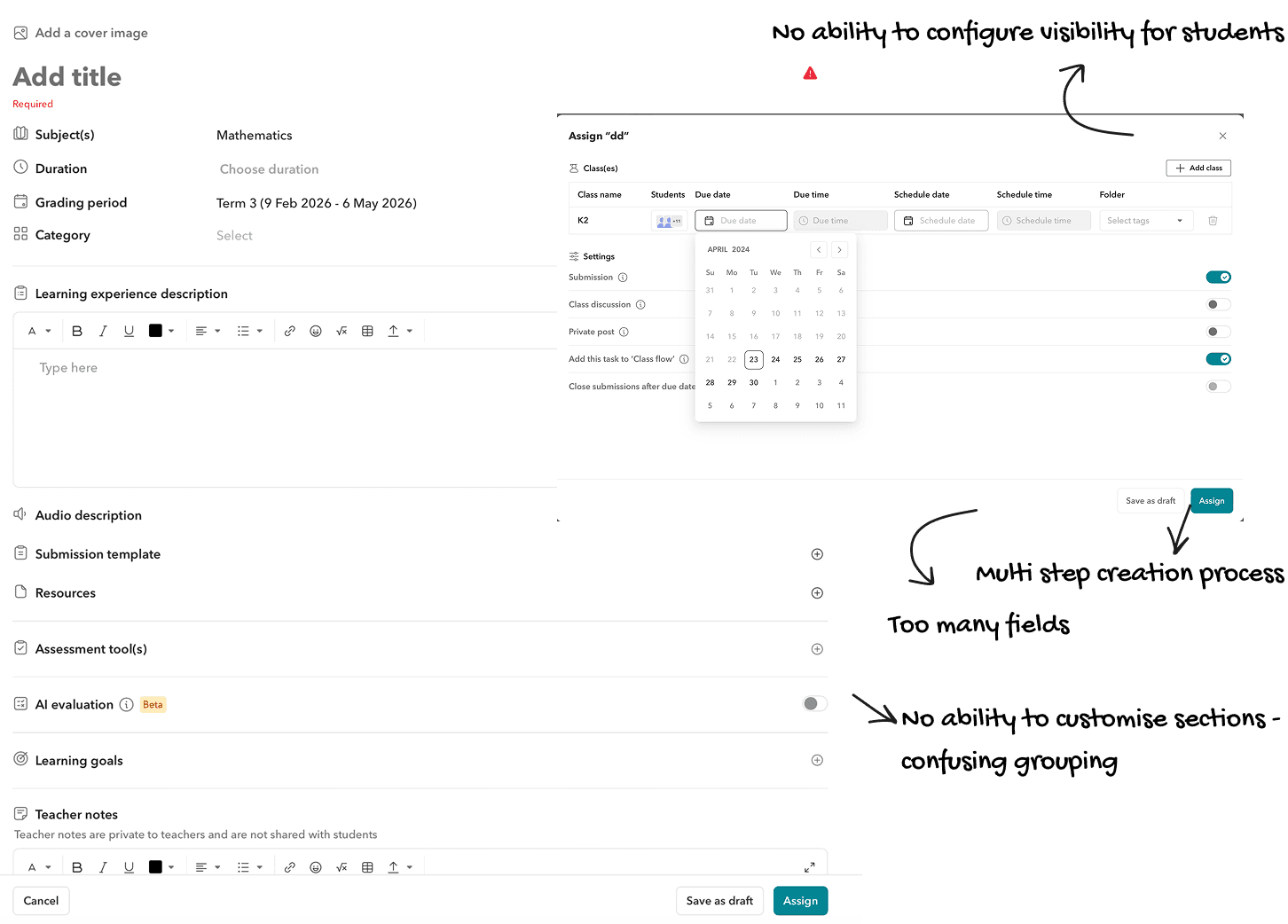
Too many clicks, too little flexibility
Assignment creation had too many fields, inconsistent grouping, and no structure to guide teachers through the process. Every field demanded attention upfront.
Schools wanted control over the order and visibility of sections so they could structure assignments their way, but the product gave them none of that. What should have been a straightforward task felt like filling out a form with no clear end in sight.
Rubrics were rigid and siloed
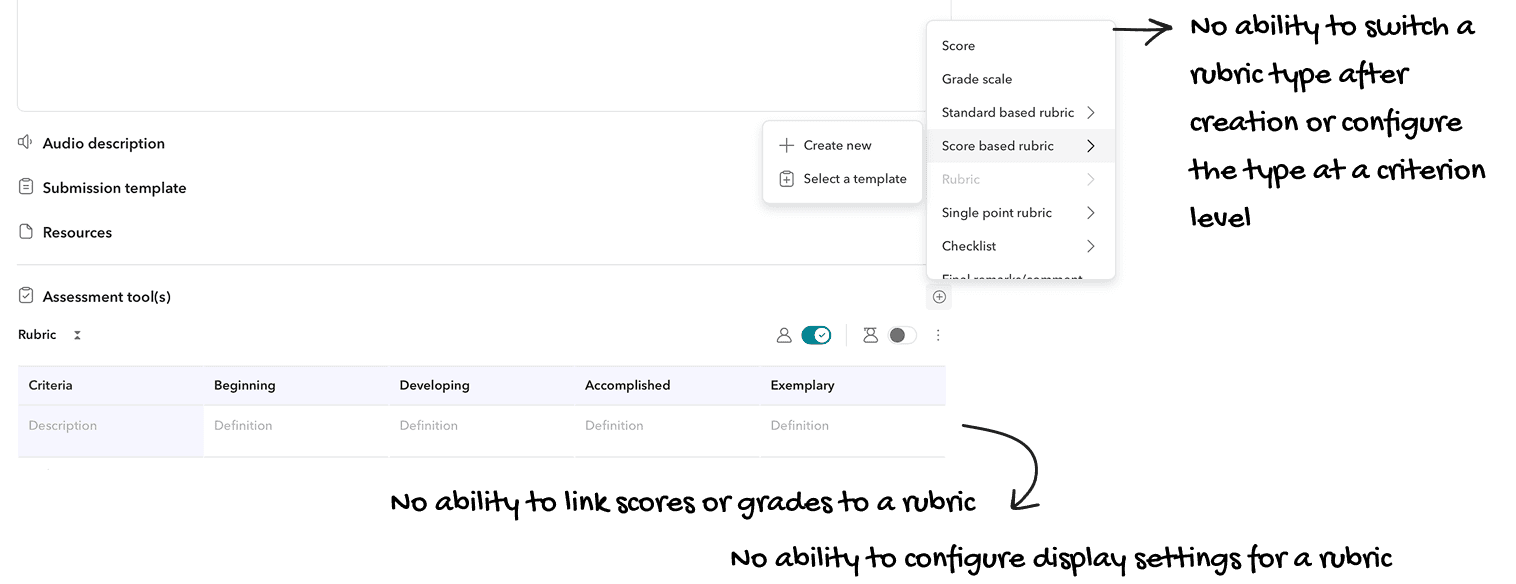
Rubrics were one of the most-used assessment tools on Toddle and one of the most frustrating. They were separated by type: standard-based, score-based, text-based. If a teacher built a rubric and then wanted to attach scores or grades to it, they couldn't. There was no way to switch rubric type after creation, no way to configure display settings like showing or hiding criteria descriptions, and no ability to link a score or grade scale to a rubric after the fact.
Teachers had no visibility into submission status from the homepage
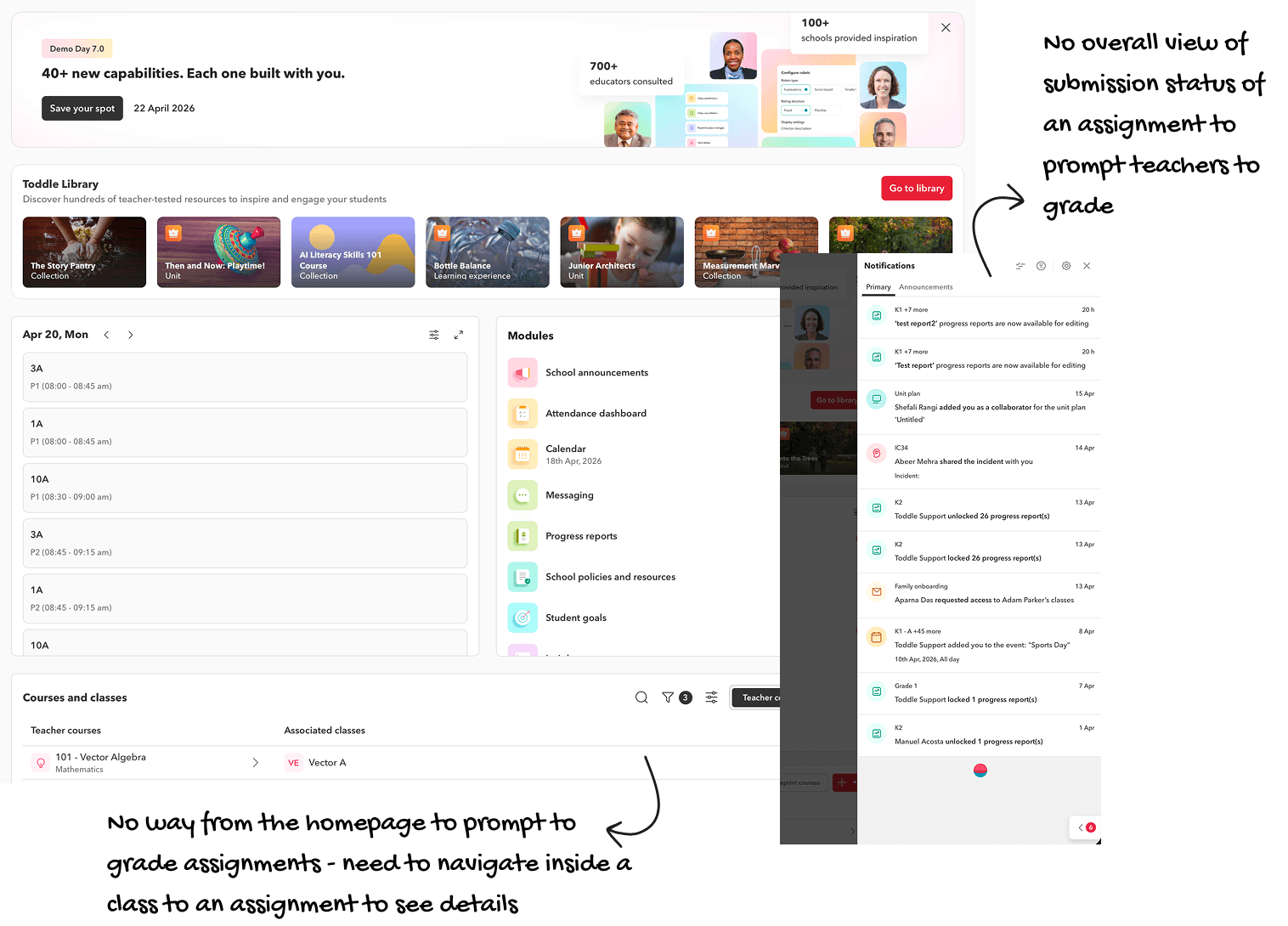
To check how many students had submitted, a teacher had to navigate into a class, find the assignment, and open it. There was no way to get a quick read on what was ready to grade, what was nearing a deadline, or what needed attention without drilling three levels deep every single time.
Navigate inside a class -> Go to assignments -> Click an assignment to view details
THE SOLUTION
Introducing assignment template customization
We chunked the sections into 4 main areas
The header - The header covers the title, banner, unit, and subject. The basics, upfront.
Details and resources - Groups the description, learning intentions, resources, submission templates, and LTI tools together because they all relate to what the student sees and works with.
Grading configurations: This is where the grading lives. Grading period and categories were moved here because the assessment tools added depended the grading period.
Teacher notes: This is a private section, clearly separated
Assign settings: Assign settings was previously a modal bolted on at the end. Now it's a section within the form, so the full creation experience lives in one place, reduce a click as well.
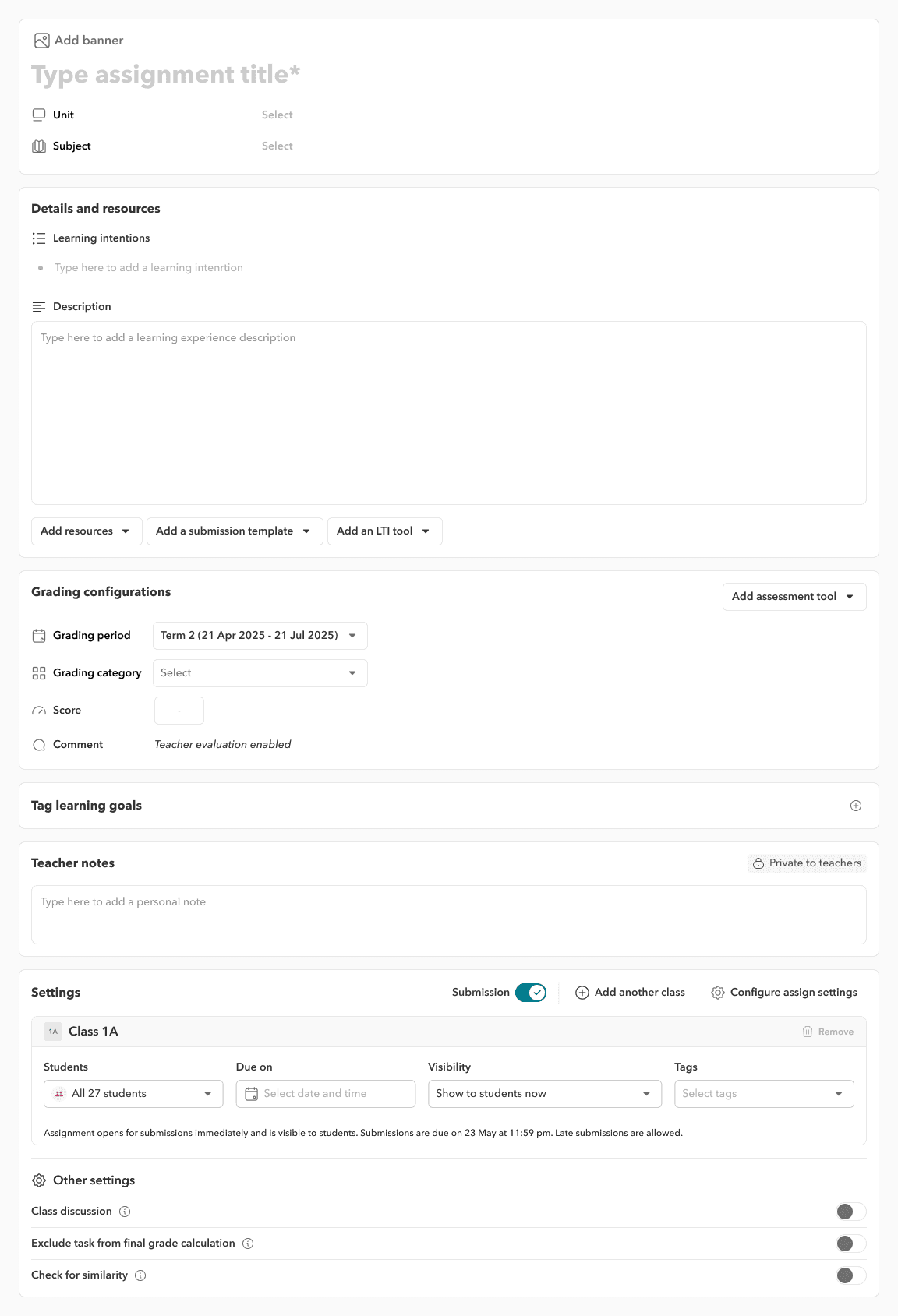
Added visibility configuration and reorderable sections
Templates now give admins control over which fields are visible, which are required, and in what order sections appear. This means every school can shape the assignment creation experience to match their structure without needing the tech team to build it for them.
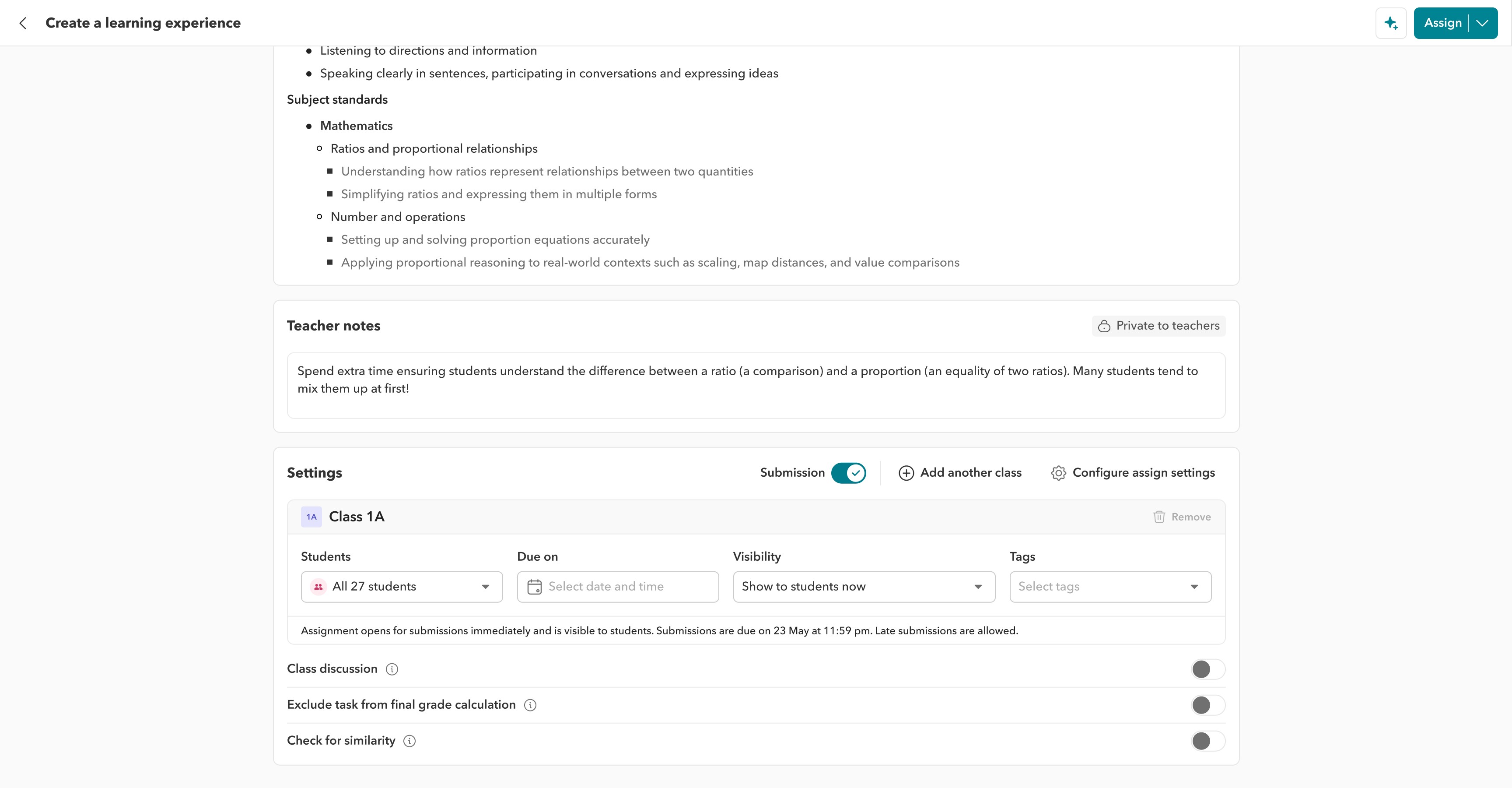
Better Assign settings
We moved the assign settings from a modal to be part of the assignments page, reducing clicks here. This was a close collaboration with Sai Charan, a senior product designer, who brought rigour and craft to getting the details right
We moved the assign settings to be a part of the creation flow instead of a modal, reduce clicks
We provided pinning functionalities as well and combined the date and time into one input field to reduce space
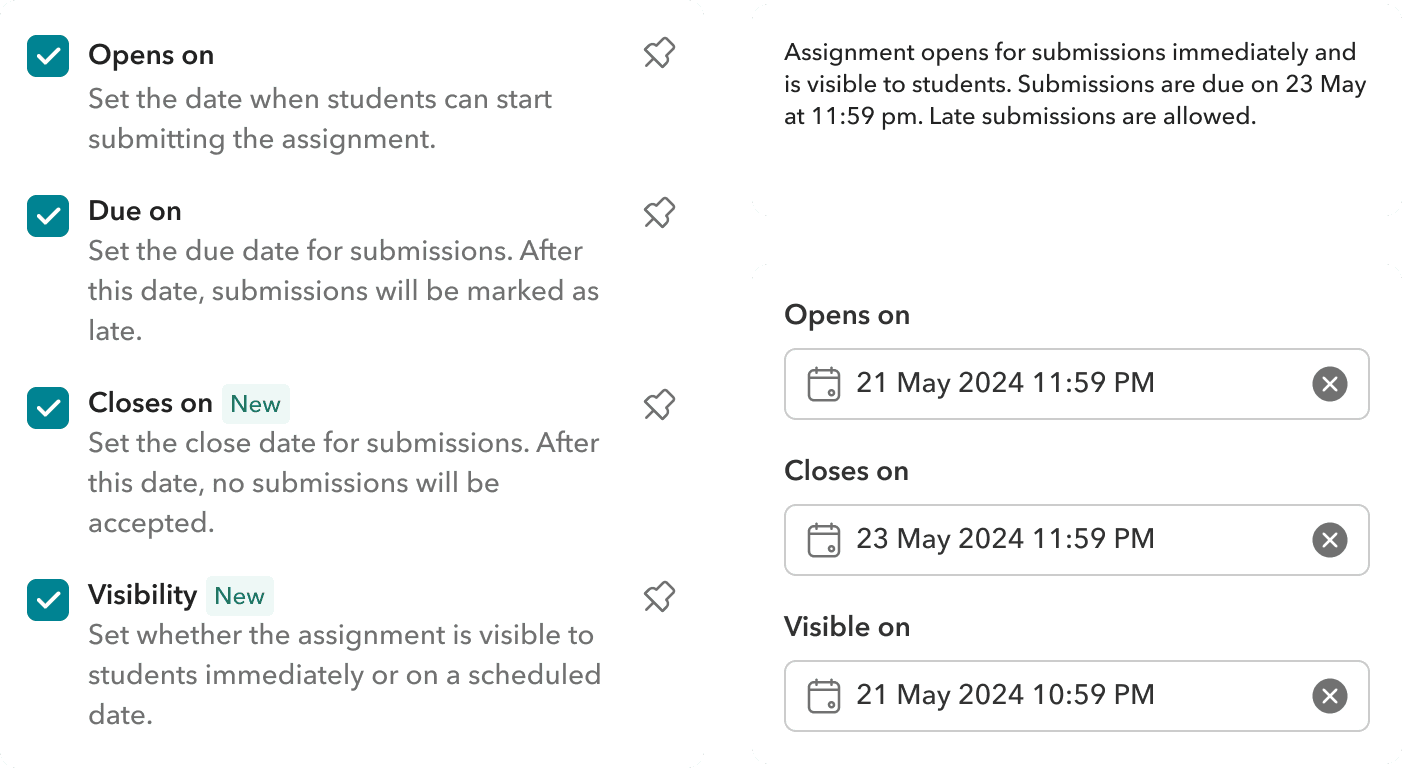
Full control over assignment visibility and scheduling
Beyond the due date, we added open date and close date fields so teachers could control exactly when an assignment becomes visible to students and when submissions stop being accepted.
Visibility settings were also expanded to give teachers more precision over what students see and when. For teachers who rely on these settings regularly, the most used fields can be pinned to the top of the assign settings section, keeping the most important controls front and centre without having to scroll past everything else.
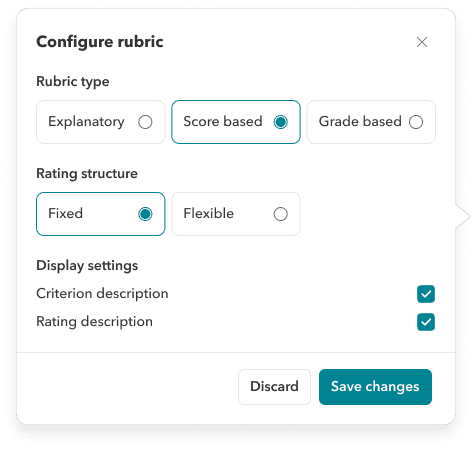
Simplified rubric creation
We unified plain rubrics, score based rubrics, and standard based rubrics into a single creation process. This was a close collaboration with Priyansh Singhara where I came in with the initial thinking and direction, and he took it further, working through the full symphony of edge cases and bringing the designs to their final, refined state.
Teachers now have full flexibility over how a rubric works and how it scores
Before this, a rubric was either descriptive or numerical. You couldn't have both. We untangled that by making scoring a layer you add on top of the rubric rather than a type you choose upfront. Teachers can now build their criteria first, then decide how performance maps to a score. The rubric does the describing. The score configuration does the calculating
How a rubric looks to students and teachers is now configurable
We added a display settings panel that lets teachers control exactly what appears in the rubric view, for themselves and for students. The underlying data stays intact.
Adding a widget on the homepage
The previous experience asked teachers to navigate into a class just to check assignment status. It was a detour that added up
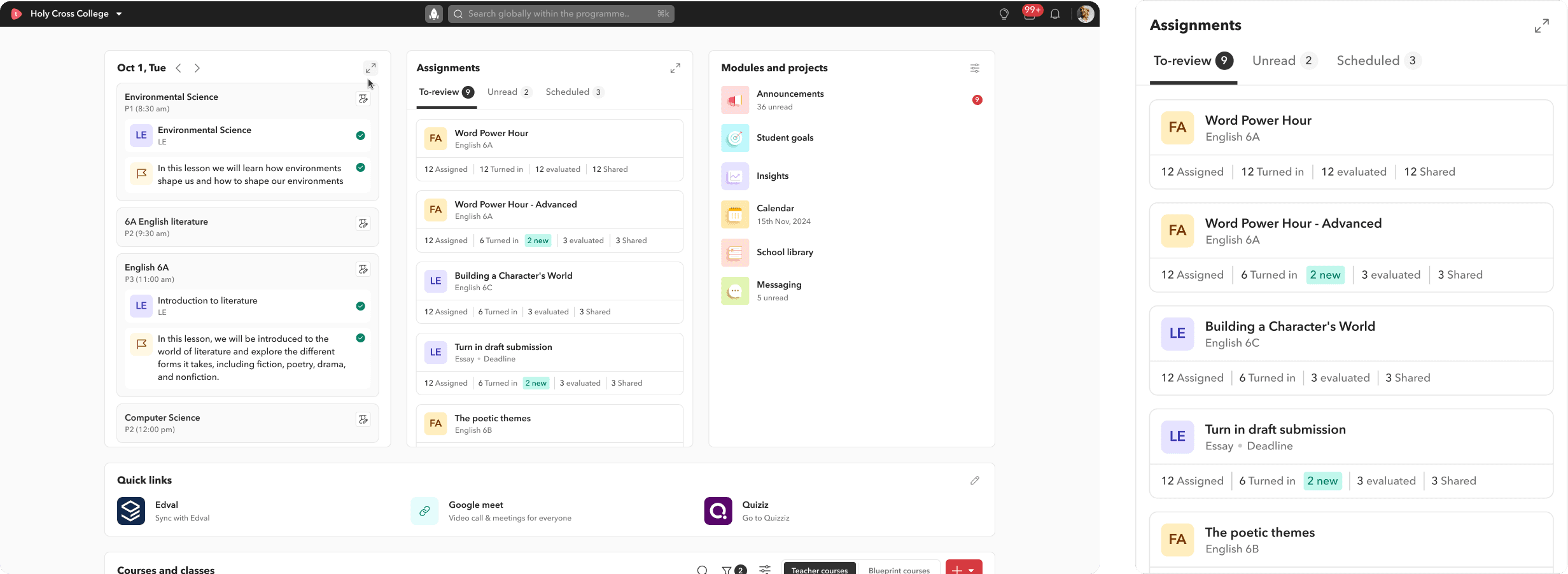
Three tabs, each with a clear job
To review was placed as the main tab: This is the default tab. Each card shows exactly how many students were assigned, how many have turned in, how many have been evaluated, and how many have had work shared back with them. At a glance, a teacher knows where they stand.
Unread: Surfaces any new activity or messages within assignments so nothing falls through the cracks.
Scheduled: Shows upcoming assignments before they go live, giving teachers a chance to review or make changes before students see them.
The same process carried through to grading, the gradebook, and overall navigation
Assignment creation was just the first affinity group. Once that shipped, we moved down the priority list — grading improvements, gradebook clarity, navigation restructuring — each one tackled in the same way. Research first, scope tightly, release incrementally, measure what changed.
Wherever a problem area was too large or too complex for one person to hold, I brought in other designers after the initial thinking was done.
I'd establish the direction, map the core decisions, and identify the edge cases that would make or break the experience. Then I'd hand it forward with enough context that the work could continue without losing momentum or intent.
Every release was followed by a testing cycle
We didn't ship and move on. We watched, we collected, and we stayed in conversation with teachers through school buddies and support channels. The feedback that came back after each release didn't go into a folder. It went straight into roadmap planning, feeding the next round of prioritisation.
REFLECTION
This project taught me that data is only as useful as the questions you ask before you collect it.
The NPS didn't just tell us what to fix. It told us who to fix it for, in what order, and why. This project sharpened how I think about research, strategy, and shipping.
01
Choosing who not to design for is a strategic decision, not a cop-out.
Ignoring our detractors felt uncomfortable at first. But it was the right call. Focusing on passives and lower promoters gave us a tighter scope, faster wins, and measurable movement in the NPS. Designing for everyone at once usually means designing well for no one
02
Fixing a high-revenue module means moving carefully, not slowly
Assignments touches grading, reports, portfolios, and student data. Every decision had downstream consequences. I learned to think in systems, not screens, and to test heavily before every release
03
Advocating for users means coming to the table with data, not opinions
Every time I needed to push back on a direction or make a case for a different approach, research was what made the room listen. NPS clusters, interview quotes, and competitor data gave me something concrete to stand behind
Like what you see? Let's connect!
I’ve built everything from grading platforms to games, always focused on making things that work well and feel right. Take a look at the ideas, the craft, and the outcomes.